Make PDF editing simple again

Edit any PDF right in your browser. Pay once. Use it forever.

Fill out forms, add your electronic signature, and download the finished PDF—without creating an account, uploading your files, or paying a monthly subscription.

One payment • No subscription • Instant download

🔒 Files never leave your device ⚡ Any browser ♾️ One-time payment
★★★★★ For everyone who's ever forgotten to cancel a "free" PDF editor trial.
lease-agreement.pdf
I agree
SIGNED ✔
PDF Penguin mascot waving with a signed PDF

You just need one signature...

Not to waste 20 minutes figuring out which email you used for your last DocuSign free trial... or waste time creating another account you'll probably never use again.

The next time a PDF lands in your inbox, you'll be able to open it, sign it, and move on with your day.

Start Signing PDFs Now

Pay once. Own it forever.

You just wanted to sign a form…

Not start another free trial you'll have to remember to cancel.

Editing the PDF is easy. Getting held hostage by software you use twice a year isn't. Ain't nobody got time for this spiral:

"I just need to sign one document."
"…wait, why am I creating an account?"
"Ugh, I’m gonna forget this password"
"…why do they need my credit card?"
"Hold on — this is a free trial?"
"Will I even remember to cancel this?"
"Ugh… didn't I already use my trial with this email?"
"Forget it." 🙃
PDF Penguin waving
PDF Penguin skips the entire spiral.

Open it → sign it → download it. No account, no trial, no upload. $29 once, and it's yours for good.

🔁The free-trial treadmill

Sign up, sign one doc, set a reminder to cancel, repeat — until you literally run out of email addresses to use.

💸Monthly bills for twice-a-year use

$20–45 every month, forever, for a tool you open 2 or 3 times. The math never maths.

📤Your private docs, uploaded

Leases, tax forms, IDs — handed to servers you'll never see, by tools that are "free" for a reason.

Unlock PDF Penguin Now

Pay $29 once. Sign PDFs digitally forever

You don't need enterprise software

You just need the PDF done.

PDF Penguin is for people who have better things to do than create another account, try to remember a password, or babysit another free-trial.

If you only need a PDF editor a few times a year, that's the point.

Yes! Give Me Lifetime Access

$29 Only • No subscription • Instant download

PDF Penguin parachuting in with the perfect PDF
How it works

Open it. Edit it. Download it.

A ridiculously simple PDF editor that runs entirely in your browser. That's the whole thing. No account, no password to remember, no subscription. Your file never leaves your laptop, because every edit happens right on your machine.

01

Open your PDF

Drag your file in and it opens instantly, right in the browser. Nothing to install.

02

Fill it out & sign electronically

Add text, check boxes, draw or place your signature, highlight important details, and white-out mistakes.

03

Download & send

Hit download and your edited PDF is ready — and it looks perfect on every device, including desktop.

Yes! Give Me Lifetime Access

One payment • No subscription • Instant download

Everything you actually need

Small penguin. Big toolkit.

✍️

Add text anywhere

Fill forms and add notes in crisp text — bold, italic, underline, any size or font.

🖊️

Sign documents electronically

Draw your signature once, place it exactly where it belongs, and download the signed PDF.

🖍️

Highlight like a marker

Three colors, baked right into the file. Perfect for research papers and contracts.

White-out mistakes

Cover up typos and old info like digital correction fluid — clean and instant.

Check the boxes

One-click checkmarks for forms, agreements, and to-do lists.

Bullets & lists

Drop in bullet points and resize them to match the rest of your document.

📋

Copy & paste

Size one element once, then duplicate it as many times as you need.

🔒

100% private

Every edit happens in your browser. Your files are never uploaded. Ever.

Start Signing PDFs Now

Pay once. Own it forever.

The privacy part matters

Your documents stay on your iceberg. 🧊

Most "free" PDF tools quietly ship your files off to their servers — leases, tax forms, medical records and all. PDF Penguin doesn't even have servers to upload to. Every edit happens right inside your browser, on your device. Close the tab and it's like you were never there.

🚫 No uploads 🙅 No account 👀 No tracking 💻 Works offline once loaded
Unlock PDF Penguin Now

Pay $29 once. Sign PDFs digitally forever

Why subscribe to what you barely use?

🐧 PDF PenguinSubscription tools
(Adobe, DocuSign…)
"Free" trial sites
What it costs$29 once~$20–45 / month, forever"Free," then paywalled
Account required?NoYesUsually
Free trial to cancel?NoneOftenYes — and it remembers you
Uploads your files?NeverCloud features doYes — to their servers
Watermarks your file?NeverNoOften
Good for a few PDFs a year?Made for itOverkill & priceyEndless hassle
Escape PDF subscriptions forever

Just $29, one-time only

Pay once. Keep it forever.

  • PDF Penguin — lifetime access $29
  • Every future update Included
  • Unlimited PDFs, unlimited edits Included
  • Use it on all your computers Included
  • A free trial to remember to cancel Never
  • A subscription bill every month Never 😌
Cheaper than the trial you forgot to cancel
$29
One-time · yours for life
Others charge $20–45 every month.
Yes! Give Me Lifetime Access

One payment • No subscription • Instant download

PDF Penguin relaxing worry-free under a palm tree
365-DAY
GUARANTEE

Try it risk-free for a full year.

Use PDF Penguin for 365 days. If it doesn't make your paperwork painless, email me any time in that year and I'll refund every penny — and you can keep the penguin. The only thing you can lose is the hassle.

Start Signing PDFs Now

Pay once. Own it forever.

Don't take our word for it

People are into it.

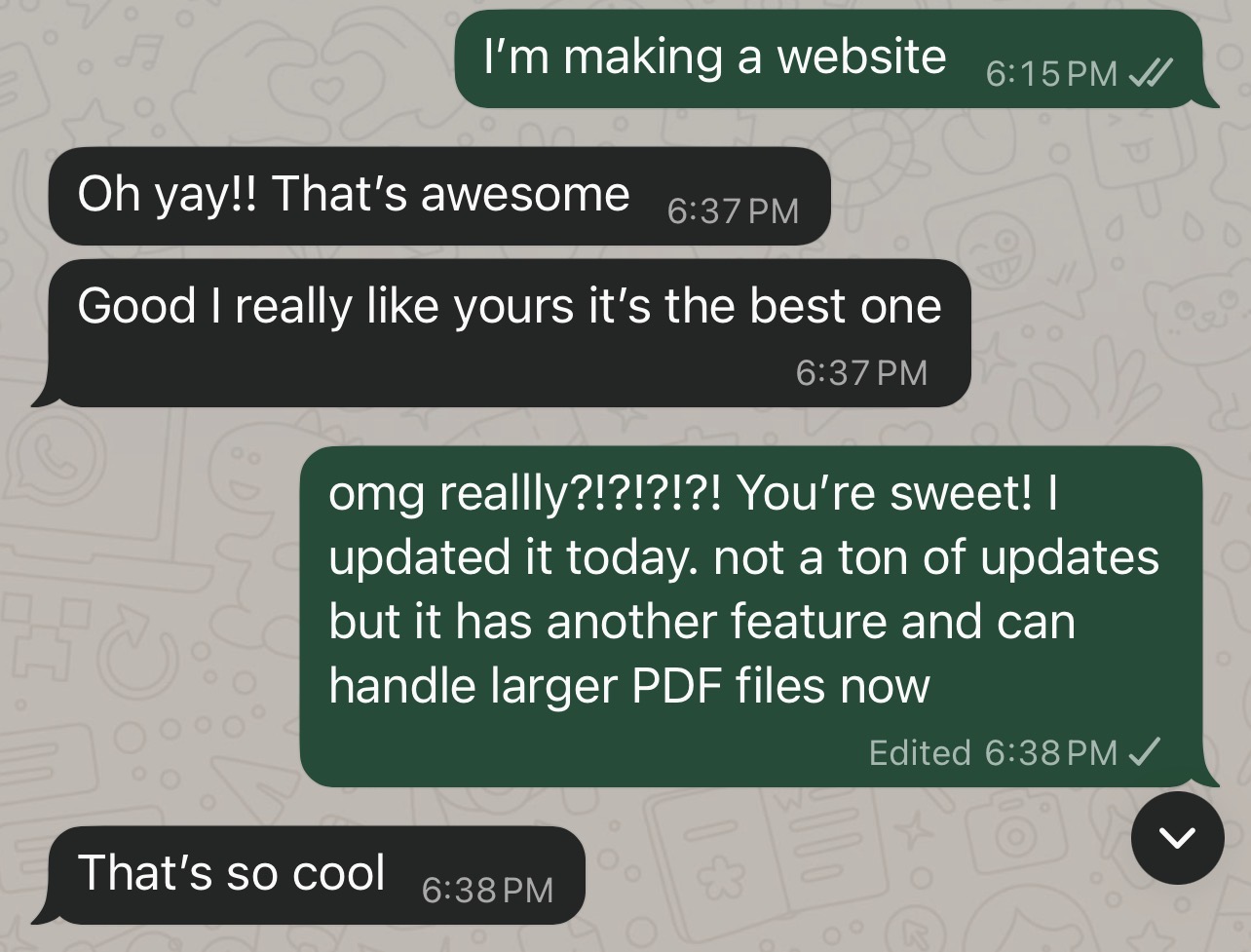
Text-message review from Kate del Castillo saying PDF Penguin is the best one
— Kate del Castillo
I really didn't want to spend $25 a month because I only needed it for a couple of things. Every PDF editor I found wanted me to start a free trial or create another account just to sign one document. With PDF Penguin, I just opened my PDF, filled in the blanks, signed it, and downloaded it. Sent it off via email. No free trial... Exactly what I was looking for. Delivered ✓✓
— Josh M.
Omg finally a PDF editor with a one-time purchase instead of milking me until I die. Every PDF editor I found wanted another annual subscription. I don't edit PDFs often enough to justify paying every year and even if I could, it's annoying. PDF Penguin was exactly what I was looking for! I needed to help my parents sign one form... that's it. Finally a one-time purchase that lets me fill out forms, sign documents, and just get on with my freaking life. Easy and quick. I'll save it for next time I have to randomly fill something out. Thanks. Delivered ✓✓
— Krista L.
Unlock PDF Penguin Now

Pay $29 once. Sign PDFs digitally forever

Good questions

Everything you're wondering.

Can I sign documents electronically with PDF Penguin?

Yes. Draw or add your signature directly to any PDF, place it where it belongs, and download and send the signed document. For paperwork requiring identity verification, notarization, or a certified audit trail, use a specialized e-signature service.

Is this a subscription?

No. It's a one-time payment of $29 and it's yours forever. No monthly fee, no renewal, no surprise charge later.

Do I have to make an account or start a free trial?

Neither. There's no account to create, no free trial to remember to cancel, and no card left on file. You buy it once and use it.

I only edit a PDF a couple times a year. Is it worth $29?

That's exactly who it's built for. One fair price now means no monthly bill and no trial treadmill the next time you need to sign something — this year, next year, or five years from now.

Are my files really private?

Yes. There are no servers to upload to. Every edit happens right on your device, inside your browser. When you close the tab, nothing is left behind.

Do I need to install anything?

No. PDF Penguin runs in your web browser — there's nothing to download or set up. Open it and start editing.

Is a signature I add legally valid?

For everyday documents — leases, permission forms, simple agreements — a signature you draw or type on a PDF is widely accepted. If a document specifically requires a certified e-signature with an audit trail (some legal or financial contracts do), a dedicated e-signature service is the right tool for that one. PDF Penguin is built for the simple, everyday stuff most of us actually need.

What can I actually do to a PDF?

Add text (bold, italic, underline, any size), sign it, highlight in three colors, white-out mistakes, add checkmarks and bullet points, and copy-paste elements. Then download the finished file.

Does it work on my computer?

Yes — any modern browser on Mac, Windows, or Chromebook. It works best on a computer (rather than a phone), and Chrome gives the smoothest experience.

Can I use it on more than one computer?

Yep. Use it on your laptop, your desktop, wherever you need it.

What if it doesn't work for me?

You're covered by a 365-day money-back guarantee. Email me any time in the first year, get a full refund, keep the penguin. No hard feelings.

PDF Penguin waving

Skip the free trial. Skip the subscription. Just sign the dang PDF.

Yes! Give me the instant download

Just $29 once, and it's yours for good.